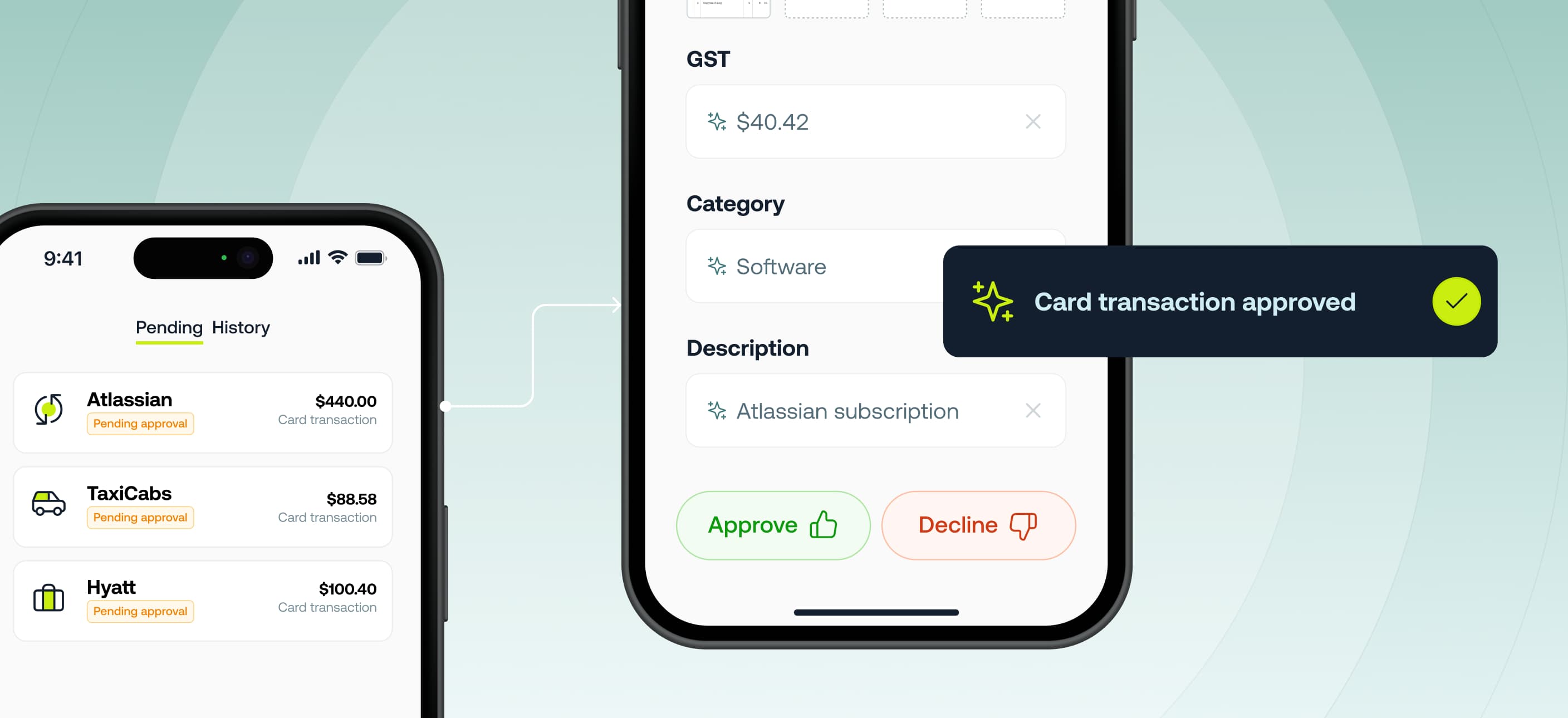

Approvers can now approve card expenses directly in the Weel mobile app. No more switching to web to complete approvals. You can view pending transactions, approve or decline, and edit transaction details where your permissions allow—plus get push notifications so nothing gets stuck.
Also new: the Reimbursements tab is now called Requests, and budget top-up requests have moved there for a clearer, more streamlined experience.
This is being gradually released to all customers on our Basic, Premium and Enterprise plans. If you can't see this in the mobile app - you will soon.
• Approve on the go. Keep spend moving without waiting to get back to your desk.
• Fewer month-end bottlenecks. Faster approvals means smoother month-ends.
• Consistency with web. The same approval actions and permissions you’re used to.
• Clearer requests. Top-ups now live in the Requests tab for easy find-and-act.
1. Update to the latest Weel mobile app.
2. Tap Approvals to see card transactions awaiting your review.
3. Open a transaction to approve, decline, or edit details (where permitted).
4. Enable push notifications in Settings to get timely reminders.
Tip: Need a budget top-up? Head to the Requests tab (formerly Reimbursements) to submit or manage top-up requests.